问题: 今天在使用spring boot的时候,我按照spring boot的要求将css、js、图片放在规定的/src/main/resource/public/js下面,却怎么也访问不到,报的是404错误,在查找资料无果后,经过反复的实验,终于找到了问题的解决方法.
首先网上的解决方法千篇一律的都是怎么使用spring boot static content,一点有价值的信息也没有。偶尔有几个老外遇到了404的问题,也是因为他的资源放错了目录,有的放到了templates下面,有的直接放到了resource下面,这跟我遇到的情况都不相同。
我的目录结构如下:
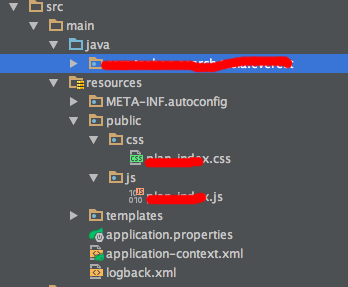
按照道理来说,是没问题的,但是访问时候却是404,我好奇怪,于是将public改成static,还是不行。
接着,我从spring boot的官网,重新生成了一个新的项目,也是添加的这样的目录结构,访问确实正常的,那么就可以肯定是某个地方配置或者是冲突导致的,我先怀疑是引入的某个jar包导致的冲突,尤其是mybatis的引入,以及@MapperScan("huster.top.mapper")的配置(具体原因是因为观察到info信息)于是我将正常的pom.xml拷贝过去,结果不行,把MapperScan去掉也不行,把ComponentScan也同时去掉还是不行...
然后我观察到正常的时候,有输出这样的info信息:
2016-12-05 21:57:05.395 INFO 91962 --- [ main] o.s.w.s.handler.SimpleUrlHandlerMapping : Mapped URL path [/webjars/**] onto handler of type [class org.springframework.web.servlet.resource.ResourceHttpRequestHandler]
2016-12-05 21:57:05.396 INFO 91962 --- [ main] o.s.w.s.handler.SimpleUrlHandlerMapping : Mapped URL path [/**] onto handler of type [class org.springframework.web.servlet.resource.ResourceHttpRequestHandler]
2016-12-05 21:57:06.119 INFO 91962 --- [ main] o.s.w.s.handler.SimpleUrlHandlerMapping : Mapped URL path [/**/favicon.ico] onto handler of type [class org.springframework.web.servlet.resource.ResourceHttpRequestHandler]
然而在不正常的工程里,却没有这个信息,那么为什么没有加载SimpleUrlHandlerMapping这个类的里面的registerHandlers方法,为啥呢。然后我发现registerHandlers是被initApplicationContext方法调用的,那么为什么SimpleUrlHandlerMapping这个类就没有在被初始化列表里呢?什么时候才会调用这个类呢?这让我想起了注册static目录的一配置方法,代码如下:
然后我添加了如下的代码,
package huster.top.configuration;
import org.slf4j.Logger;
import org.slf4j.LoggerFactory;
import org.springframework.context.annotation.Configuration;
import org.springframework.web.servlet.config.annotation.ResourceHandlerRegistry;
import org.springframework.web.servlet.config.annotation.WebMvcConfigurerAdapter;

import java.io.File;

/**
 */
@Configuration
public class StaticResourceConfiguration  extends WebMvcConfigurerAdapter {

    private static final String[] RESOURCE_LOCATIONS = { "classpath:/META-INF/resources/", "classpath:/resources/", "classpath:/static/", "classpath:/public/" };
    Logger logger = LoggerFactory.getLogger(StaticResourceConfiguration.class);
    @Override
    public void addResourceHandlers(ResourceHandlerRegistry registry) {
        try {
            File directiory = new File("");
            logger.info(directiory.getCanonicalPath());
            registry.addResourceHandler("/**").addResourceLocations(RESOURCE_LOCATIONS).addResourceLocations("file:" + directiory.getCanonicalPath() + "/");
        } catch (Exception e) {

        }
    }
}
上面的代码一加,果然就可以了,但是我始终想不通问题出在哪里,一定是我加了什么多余的配置,导致了资源文件访问不到的问题,应该删除代码才对,而不是加代码。
这个时候我的思路转向了查找为什么SimpleUrlHandlerMapping这个类没有被加载的问题上,然而spring boot的源码太大了,不是一时半会能看完的,所以我还是以删除代码尝试为主。
在经过以上尝试以后,我突然想到了我增加的一个解决跨域问题的一个配置上面,这个是为了解决ajax访问跨域问题的
Cross-origin resource sharing (CORS) is a W3C specification implemented by most browsersthat allows you to specify in a flexible way what kind of cross domain requests are authorized, instead of using some less secured and less powerful hacks like IFrame or JSONP.
我参考的是这篇文章: https://spring.io/blog/2015/06/08/cors-support-in-spring-framework
我的代码如下:
package huster.top.configuration;

import org.springframework.context.annotation.Bean;
import org.springframework.context.annotation.Configuration;
import org.springframework.web.servlet.config.annotation.CorsRegistry;
import org.springframework.web.servlet.config.annotation.EnableWebMvc;
import org.springframework.web.servlet.config.annotation.WebMvcConfigurer;
import org.springframework.web.servlet.config.annotation.WebMvcConfigurerAdapter;

/**
 * Created by longan.rtb on 16/7/1.
 * 全局配置
 */
@Configuration
@EnableWebMvc
public class CORSConfiguration extends WebMvcConfigurerAdapter {

    @Bean
    public WebMvcConfigurer corsConfigurer() {
        return new WebMvcConfigurerAdapter() {
            @Override
            public void addCorsMappings(CorsRegistry registry) {
                registry.addMapping("/**")
                        .allowedOrigins("http://localhost:3333")
                        .allowedOrigins("http://127.0.0.1:3333")
                        .allowedMethods("POST", "GET");
            }
        };
    }

}
我将上面的@EnableWebMvc去掉之后就好了,所以这里是跨域问题导致的spring boot 的static content不可访问的问题。
那么@EnableWebMvc,这玩意儿是干嘛的呢?这东西是为了让你的@RestController和@RequestMapping生效的配置,是spring framework提供的功能,而我们的spring boot里根本不需要这玩意儿,所以直接放心的去掉,整个系统就正常了.
至于为什么加了这个,就导致mapping 扫描的时候,不可用,这个还有待进一步的研究。